

This plugin is included in CORE and PRO subscriptions! Learn more
Metric AB
Streamlined A/B comparisons
ADPTR AUDIO’s Metric AB is the go-to reference plugin for seeing and hearing how your mix compares to commercially released songs with the click of an “A/B” button. The most recent update includes features the music production community has demanded, giving you more control and enhancing the overall user experience.
Streamline your workflow
All the reference meters you need for mixing and mastering. Insert Metric AB on your master channel, key bind the “A/B” button, and quickly toggle between mixes using your keyboard.
Instant loudness matching
Drag and drop up to 16 reference tracks into Metric AB. Match the loudness of your mix and every reference track at once. There are four different loudness-matching modes to choose from. Eliminate loudness bias and conduct accurate A/B comparisons in seconds.
Precise playback options
Sync the playback of reference tracks with your DAW. Set cue markers to play references at the beginning of different song sections. Depending on your preference, select the Latch, Cue, Sync, or Manual playback mode to change the playback behavior of reference tracks.
See the differences
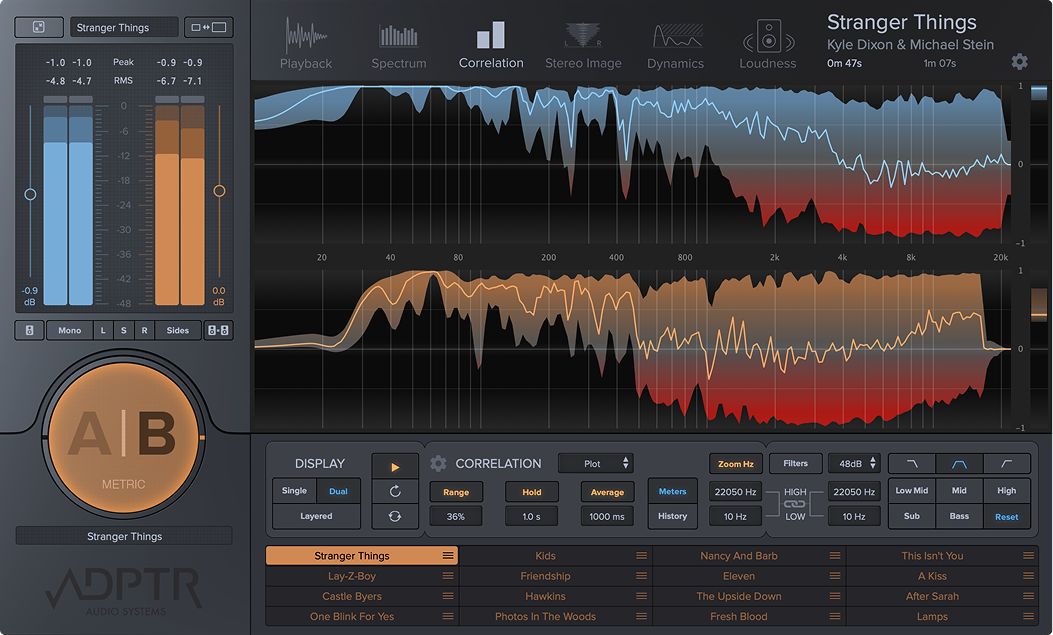
Get technical with multiple analysis modes: spectrum, correlation, stereo image, dynamics, and loudness (LUFS). Select from various graph options, including Plot, Octave, 3rd Octave, Critical, and Multi. View the A stream (blue) and B stream (orange) information individually, side by side, or layered together to pinpoint the smallest mix variances.
Hear the differences
Mastering meters are helpful for identifying technical mix discrepancies. Although, you should also use your ears to determine whether or not you need to make changes to your mix. Metric AB’s filter bank allows you to solo different frequency ranges and audition your audio with precision.
Support for multiple audio formats and languages
Metric AB can play back reference tracks in various formats, including WAV, AIFF, FLAC, M4A, and MP3. Character support for a wide range of languages is also included, ensuring the track titles of your favorite songs display as intended.
New in Metric AB version 1.4
Metric AB version 1.4 includes support for Apple's M1 and M2 chips in all major plugin formats including, AAX for Pro Tools, a resizable UI, GUI enhancements, usability upgrades, additional file compatibility, improved filters, better DAW compatibility, and numerous bug fixes. Key enhancements include new loudness match modes, a re-optimized graphics drawing system, enhanced filter accuracy, and expanded MIDI parameter availability.


Features
- Filter Bank Workflow – Instantly create, edit, and bypass filters
- Spot Filter – Create a two-octave listening filter with a single click
- Save Custom Filter Presets – Save and recall your complete Filter Bank setup to streamline your workflow across sessions
- Advanced Loudness Matching – Compare mixes more accurately with new loudness matching modes
- Integrated LUFS Metering – Monitor Integrated, Short-Term, and Momentary LUFS directly for faster level analysis
- Global Sync Offset – Update sync positions across multiple reference tracks simultaneously
- Improved Sync Playback – Keep reference tracks perfectly aligned with your DAW
- Per-Page Display Settings – Customize the display mode independently for each analysis page
- RAM Playback – Faster and more responsive playback performance
- Seamless Looping – Enjoy uninterrupted A/B comparisons with improved loop playback
- Retain Cue & Loop Points – Replace reference tracks without losing cue markers or loop settings
- Expanded Metering – True Peak, RMS, and Dynamic Range meters to provide greater insight into your audio
- Higher Resolution Display Options – View for critical listening and precision referencing
Sound Examples
Product Information
Specifications
AAX Native, AU, VST2, VST3
Downloads
With the Installation Manager you can select, download & install all the Plugin Alliance products. Select any and all formats you need for your system! Mac & PC.