

STEREOVAULT
INTRO DEAL — BUY STEREOVAULT, GET 1 FREE PLUGIN
Add STEREOVAULT and one of these other Mastering The Mix plugins to your cart, and get the other one completely free! Deal ends: Jun 5, 2026.
Choose your free plugin with STEREOVAULT:
- STEREOVAULT + LEVELS
- STEREOVAULT + MIXROOM
- STEREOVAULT + BASSROOM
- STEREOVAULT + LIMITER
- STEREOVAULT + ANIMATE
- STEREOVAULT + EXPOSE 2
STEREOVAULT analyses your audio and helps you dial in the right stereo width for your mix — not just more width, the right width.
Smart Presets
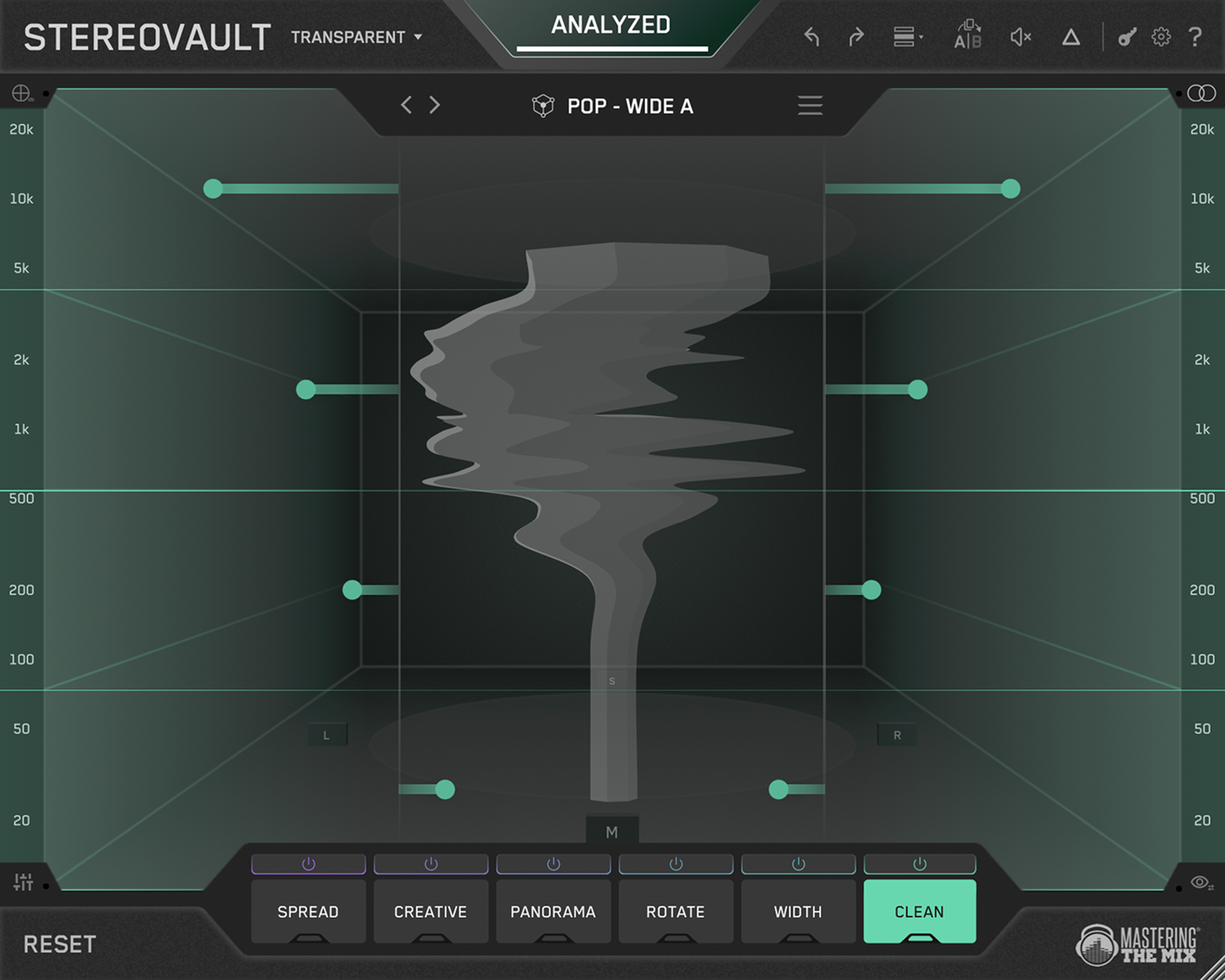
Users play the loudest section of their audio and hit Analyze. STEREOVAULT listens to the signal and suggests a smart preset built for that source type and genre. Four width options — Focused, Balanced, Wide, and Super Wide — are relative to that context, so a Wide preset on a vocal targets a very different result than Wide on a full master. Smart Presets always use the Clean tab for maximum transparency, giving users a trustworthy starting point in seconds before they fine-tune with the other processing tabs.
Level Match
Once the audio has been analysed, STEREOVAULT level-compensates all adjustments so the output stays matched to the input. Wider stereo processing tends to raise the perceived loudness of a mix. Without compensation, users pick settings that feel exciting because they are louder, not because they are better. Level Match removes that bias so every decision is made on the actual stereo change alone.
Stereo Visualiser
Shows stereo width in real time across the full frequency spectrum. Low frequencies appear at the bottom, highs at the top, and the horizontal spread shows how wide things are at each point. 3D mode maps Mid and Side energy into a room-like view — sounds with more Mid energy appear closer and more forward, sounds with more Side energy appear further away — making stereo placement visual and intuitive. A phase display overlay turns red to warn when processing is approaching problematic levels.
Six processing tabs
Spread, Creative, Panorama, Width, Rotate, and Clean give you per-band control over stereo enhancement, positioning, Mid/Side balance, and side EQ.
Transparent and Flexible Modes
Transparent Mode uses fixed crossover filters that are shared across all processing tabs. The crossover points cannot be moved, which allows STEREOVAULT to use ultra-clean, mastering-grade filters with no colouration between bands. Ideal for mix bus and mastering work where even tiny artefacts matter and invisible processing is the goal.
Flexible Mode allows users to place bands wherever they like, with each tab maintaining its own independent band layout. More flexible than Transparent Mode and better suited to mixing individual stems, creative stereo shaping, and sound design where different processing in different areas of the same spectrum is needed.
Specifications
Format: VST3, AU, AAX
Platforms: macOS, Windows
Features
- Smart Presets analyse the audio and suggest a genre-specific, context-aware starting point across Focused, Balanced, Wide, and Super Wide options. Always use the Clean tab for maximum transparency.
- Level Match compensates for loudness after every analysis so comparisons are honest. Wider processing sounds louder. Level Match removes that bias entirely.
- Stereo Visualiser shows real-time stereo width across the full frequency spectrum in 2D or 3D mode. 3D maps Mid and Side energy into a room view for depth and placement. Phase display warns when processing is going too far.
- Transparent Mode uses fixed, mastering-grade crossover filters shared across all tabs. Designed for clean, invisible stereo control on mix and master buses.
- Flexible Mode allows freely placed, independent band layouts per tab. Designed for detailed mixing, creative shaping, and sound design.
- Spread Tab — Pristine adjusts the Mid/Side balance and injects side energy for clean, direct width control. The fastest way to dial in a simple width adjustment.
- Spread Tab — Diffuse uses cascaded allpass filters tuned per band to spread the stereo image smoothly without colouration or phasiness. The cleanest option for mastering.
- Spread Tab — Vintage uses an Orban-style pseudo-stereo algorithm to create genuine width from mono or narrow material. Collapses to mono perfectly. Ideal for mono synths, centred vocal stacks, and single-mic recordings.
- Creative Tab contains Stretch (comb filtering, Roland-style chorus character), Flux (slow modulated allpass width for pads and atmospherics), Haas (short delay-based stereo width), and Space (Dattorro reverb spread for depth without decay).
- Width Tab redistributes Mid and Side energy per band using Blend (channel energy crossfade) and Balance (independent M/S level control). Changes the perceived width by altering the ratio of centre to edge energy.
- Clean Tab transparent Side EQ or Mid EQ. In Side mode, boosts or cuts the side signal in dB for precise width control with strong mono compatibility. In Mid mode, adjusts the centre of the signal per band.
- Panorama Tab frequency-specific panning (Pan) and stereo rebalancing (Skew). Move different parts of the frequency spectrum independently without affecting the whole signal.
- Rotate Tab tilts stereo energy within the field on the full signal, Mid only, or Side only. Creates separation and carves space in a way that level-based panning cannot.
- Reference Track Import analyses a reference track and generates a width preset based on its stereo profile. Gives users a real target to work toward rather than a generic setting.
- Up to 6 Frequency Bands per tab with drag-to-move crossover points, adjustable slopes, and QuickSplit for instant setup.
- A/B Comparison two independent plugin states for instant side-by-side evaluation of any two settings.